
What is an MCP server? Tools, context and boundaries explained
Understand how an AI application connects to useful tools and information — and which responsibilities the protocol does not take over.
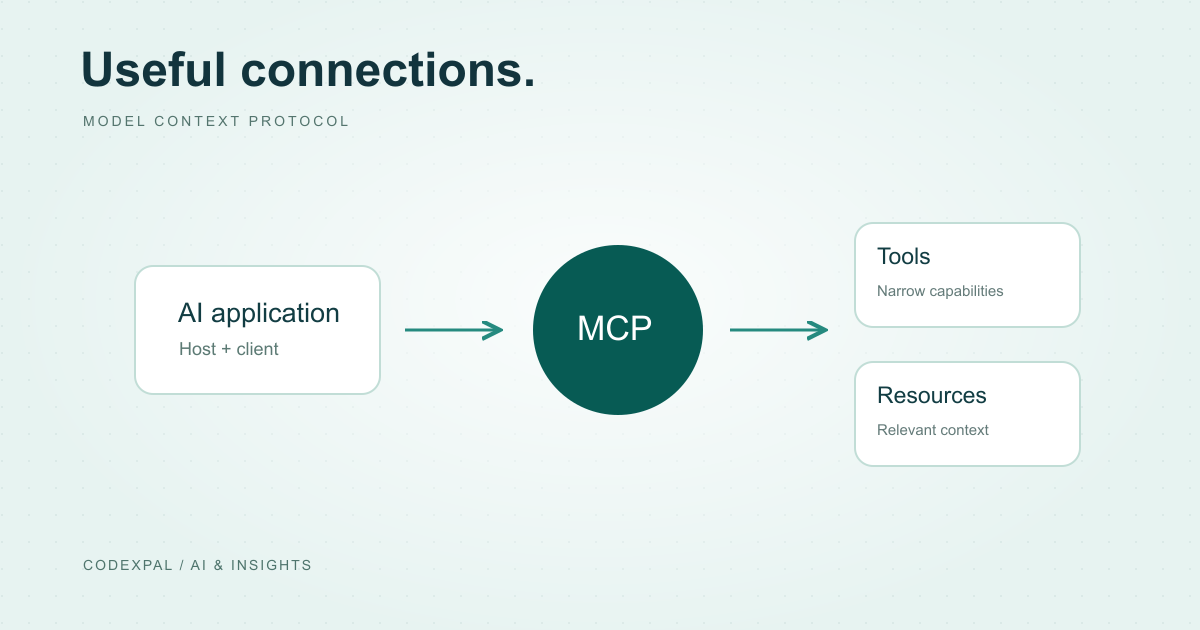
A model may be able to explain an inventory report, but it needs an integration to read the report from your system. Model Context Protocol, or MCP, provides a shared way for an AI application to discover and use capabilities exposed by another program. An MCP server is that program. It can run locally or remotely, and its usefulness depends on the tools, information and controls you deliberately give it.
Separate the host, client and server
The host is the AI application coordinating the interaction. An MCP client is the host-side component talking to a server. The server exposes capabilities such as executable tools, readable resources and reusable prompt templates. The protocol does not choose your model or decide your application’s business rules.
Local servers can communicate over standard input/output. Remote servers commonly use Streamable HTTP. This guide follows the architecture documentation dated 2026-07-28; transport and SDK details should be checked against the protocol version your host actually supports.
Where an MCP server fits
- 01HostThe AI application
- 02ClientThe protocol connection
- 03ServerExposed capabilities
- 04SystemPermitted data or tools
Reference: MCP — Architecture overview, 2026-07-28 documentation
Start with one useful read-only tool
Imagine an internal assistant that checks a product’s stock. A narrow get_stock tool can accept a SKU and return a quantity, warehouse identifier and observation time. That is easier to reason about than a tool that accepts arbitrary SQL and executes it with broad database privileges.
Describe what the tool does, which input it needs and what each result means. For example, distinguish stock on hand from stock available after reservations. A clear description reduces ambiguity before the model ever makes a call.
Define an interface before choosing an SDK
The JSON below is an illustrative tool descriptor, not a complete protocol request or a working MCP server. It records a tool’s purpose and argument shape. A real implementation must use the SDK and protocol version supported by your host.
After validating the SKU, the server should use the authenticated user’s permitted scope when reading records. A warehouse ID returned by the model must not become evidence that the user is entitled to access that warehouse.
{
  "name": "get_stock",
  "description": "Read available stock for one SKU in the user’s permitted warehouses.",
  "inputSchema": {
    "type": "object",
    "properties": {
      "sku": { "type": "string", "minLength": 1, "maxLength": 80 }
    },
    "required": ["sku"],
    "additionalProperties": false
  }
}
Treat connection and authority as different questions
A successful connection establishes that two components can communicate. It does not establish that every requested action is appropriate. Validate inputs, apply authorization within the server and keep credentials scoped to the minimum required access.
For a later write tool, such as reserving stock, specify how authorization, confirmation and duplicate requests are handled. Log an action identifier and its outcome without dumping secrets into the conversation. Review the protocol’s security guidance alongside your own application threat model.
Reference: MCP — Security best practices
Test failures before connecting a real workflow
Test a valid SKU, an unknown SKU, an unavailable inventory service and a user who lacks warehouse access. Make error results distinguishable from zero stock. Otherwise the assistant may turn an integration failure into an incorrect business answer.
Then inspect whether the host selects the right tool, asks for missing details and explains the result accurately. Connecting more servers should be a deliberate expansion of capability, not a substitute for testing the one integration your user actually needs.
The takeaway
An MCP server makes a capability available through a shared protocol. Start with a narrow interface, clear results and enforced access rules. The protocol helps components communicate; the application remains responsible for trustworthy behavior.
Sources & further reading
Primary references checked on October 18, 2026. Examples and diagrams are illustrative unless stated otherwise.
More to think about.
AI agents vs workflows: choose the right amount of autonomy
A fixed process and a tool-using agent solve different problems. Here is how to choose, with a practical support example.
What is RAG? A practical guide with a simple diagram
How retrieval gives an AI application useful context — and how to build a small retrieval baseline before adding a vector database.